UploadWords.com Free Tool: Is It Worth Using for Writers?
Need a quick word count or keyword check? Here is what this free text tool offers, how it works, and where its limits begin.

Writing looks simple. Checking it takes work.
You might finish a long article. Then you notice repeated words everywhere. Maybe your assignment has a strict word limit. Or your blog post needs another check before publishing.
That is where the UploadWords.com Free Tool comes in.
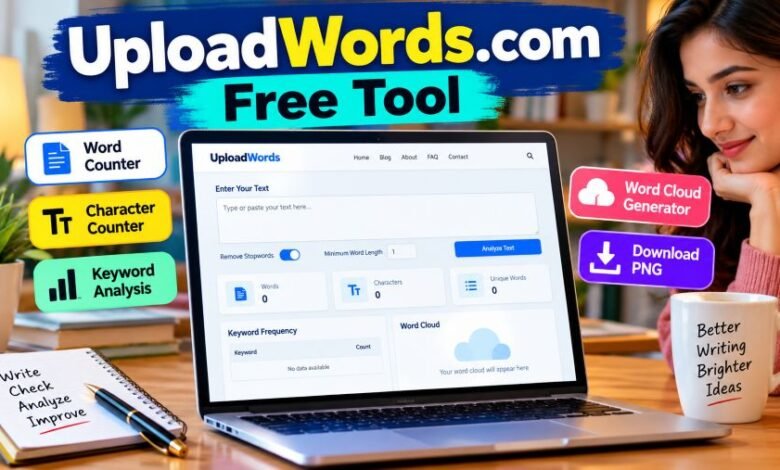
It counts words and characters. It finds frequently repeated terms. It can also turn those words into a visual word cloud.
No complicated setup is advertised. You open the website and add your text.
But how useful is it? Does it really cost nothing? And can writers trust its results?
Here is what the website actually offers.
What Is UploadWords.com?
UploadWords.com is a free online text-analysis website. It helps people examine written content through a browser.
The main tool covers three tasks: counting words, identifying repeated keywords, and creating word clouds.
Students can check assignment lengths. Bloggers can review repeated terms. Content writers can examine drafts before publication.
The website also offers character counting. This helps with shorter content, including descriptions and text with length limits.
According to its official FAQ, users do not need to register or purchase a subscription to access the main tool.
You can visit the official UploadWords tool directly.
One point needs to be clear.
This is a text-analysis service. It is not a full writing editor, online document storage system, or professional SEO research platform.
Quick Facts
| Feature | Details |
|---|---|
| Website name | UploadWords |
| Official domain | uploadwords.com |
| Main service | Free text analysis |
| Word counter | Available |
| Character counter | Available |
| Keyword frequency | Available |
| Word cloud | Available |
| Image export | PNG |
| Account required | No |
| Subscription | Not required |
| Text input | Copy and paste |
| Advertised file support | TXT |
| Advertised maximum file size | 4 MB |
| Minimum word length filter | Available |
| Stopword removal | Available |
| Mobile access | Supported according to website |
| Support email | admin@uploadwords.com |
| Publicly verified founder | Not established |
The information comes from the website’s tool, FAQ, and About pages. Some features may change.
What Features Does the Website Offer?
The main features are fairly basic. That is part of their appeal.
Instead of showing dozens of settings, the tool focuses on checking text and presenting the results.
1. Word and Character Counting
The first feature counts written words.
Suppose you have a 1,000-word assignment. You want to check its length before submitting it.
Paste your writing into the editor. Run the analysis.
The tool displays the word total.
It also counts characters. That matters for short descriptions, online forms, and other text with character limits.
Still, counting rules can differ.
Hyphenated words, numbers, and special characters may produce different totals across different services. UploadWords says it cleans extra spaces and symbols during counting.
For strict academic requirements, compare its result with your institution’s preferred counting method.
2. Keyword Frequency Checker
Repeated words can become annoying.
Sometimes writers do not notice them. A word might appear again and again without adding anything useful.
The keyword-frequency feature helps identify those patterns.
For example, imagine writing an article about electric vehicles. Words such as “battery,” “charging,” and “electric” may appear repeatedly.
UploadWords can list frequently occurring terms and show their counts.
That makes repetition easier to notice.
But remember one thing.
Keyword frequency is not Google search volume. The tool checks words inside your submitted text. It does not tell you how many people search for those terms online.
3. Word Cloud Generator
This feature makes text visual.
A word cloud displays words at different sizes. Terms used more frequently generally appear larger.
Imagine analyzing customer feedback.
If “delivery” appears many times, it may stand out in the cloud. Less common terms appear smaller.
This can help users see common themes at a glance.
UploadWords also provides a PNG download option.
That image can be useful for presentations, classroom discussions, and basic content reports.
Still, word clouds have limits. They show frequency, not the meaning behind every sentence.
4. Stopword Removal
Some words appear almost everywhere.
Think about “the,” “and,” “is,” and “of.”
These words are part of normal writing. But they can crowd a keyword list.
UploadWords includes a stopword-removal option.
Turning it on filters common words. This can make meaningful terms easier to identify.
The results depend on the filter. Turning it off may change the keyword list and word cloud.
5. Minimum Word Length Filter
Short words sometimes add little value.
The minimum-word-length setting helps filter them.
For example, setting a minimum length of four characters can remove shorter terms from keyword results.
This is especially useful when reviewing larger blocks of writing.
But shorter words are not always useless. Abbreviations and important names can also be short.
Choose the setting carefully.
6. Copy Results and PNG Downloads
Analysis is useful only when you can work with the results.
The tool page includes a Copy Results control. It also offers a Download PNG option for word clouds.
Writers can use copied data in notes. Students can keep their word-cloud images for presentations.
The availability of these controls is confirmed on the published tool page.
How Does the Free Tool Work?
The process is straightforward.
Step 1: Open the website
Visit uploadwords.com and select the main tool.
Step 2: Add your content
Paste the text you want analyzed. The dedicated tool page also advertises TXT file uploads.
Step 3: Choose your settings
Turn stopword removal on or off. Adjust the minimum word length if needed.
Step 4: Analyze the text
Select Analyze to view the results. The FAQ also says results can update automatically while typing.
Step 5: Review the numbers
Check the word count, character count, and most frequent keywords.
Step 6: Save what you need
Copy the analysis results or download the word cloud as a PNG image.
That is the basic workflow.
No account creation is required according to the company’s published instructions.
Who Can Benefit From This Tool?
Different users need different checks.
For some, word length matters most. Others want to find repeated language.
Students and Teachers
Assignments often have word limits.
A student might need exactly the right amount of writing for an essay or project.
This tool offers a quick length check.
Teachers can also use word clouds to discuss common themes in reading material.
Still, students should follow their school’s submission rules.
Bloggers and Content Writers
Blog posts need careful editing.
Long drafts can contain repeated phrases. Sometimes those repetitions are easy to miss.
Keyword-frequency results help writers notice them.
Character counts can also help check proposed titles and descriptions.
But the numbers cannot judge the quality of an article.
A piece can have perfect word counts and still contain weak explanations or factual mistakes.
SEO Professionals
SEO writers may find the frequency checker useful.
They can see how often certain words appear. They can also examine whether important subject terms are represented.
But proper SEO research requires more information.
UploadWords does not advertise Google search-volume data, keyword-difficulty scores, or competitor ranking reports.
Use it for checking text. Use dedicated SEO platforms for broader research.
Researchers and Office Workers
Research notes often repeat certain terms.
A keyword list may help show common subjects. A word cloud may also provide a quick visual for a meeting.
For example, a team reviewing non-confidential customer comments could use a word cloud to spot repeated topics.
The results still need human interpretation.
Is UploadWords Completely Free?
The official FAQ describes the service as completely free.
It states that users do not need a subscription, account, or login. No hidden charges are advertised for the main analysis features.
That makes the service accessible to occasional users.
Someone checking a single assignment may not want another paid subscription. A basic browser tool can be enough.
The dedicated tool page also describes an ad-free experience.
These statements reflect the website’s current published information, rather than a promise about future pricing.
Can You Upload PDF or Word Documents?
File support needs a closer look.
The dedicated tool page advertises TXT uploads. It lists a maximum file size of 4 MB.
The FAQ repeats this limit. It also says DOCX support may be added later.
However, the homepage contains an older-looking statement saying file uploads are coming soon.
Those messages do not fully match.
So the safest description is this: TXT uploads are advertised on the dedicated tool page, but live availability should be checked before relying on that feature.
Direct PDF and DOCX uploads are not confirmed.
If your document uses another format, copying its text into the editor may be the simpler choice.
No advanced document-format conversion feature is established in the official documentation.
Is the Website Safe to Use?
Privacy deserves attention.
Especially with unpublished writing.
UploadWords describes its service as privacy-first. Its About and tool pages say text processing happens in the browser.
The website also states that submitted text is not published publicly or sold to third parties.
That sounds reassuring.
But its privacy policy contains more details.
The policy says the website may collect technical information. This includes IP addresses, browser details, device information, approximate location, and website usage data.
It also describes limited information sharing with hosting, analytics, and security service providers.
These statements are not necessarily contradictory. Tool text and technical website data are different categories.
Still, users should understand both.
The policy does not provide an independently verified security audit of its browser-processing claims.
Avoid entering passwords, bank information, private identification details, confidential contracts, or protected customer records.
The website itself warns against submitting highly sensitive information.
For everyday writing checks, the published features may be useful. For confidential material, follow your organization’s data-handling rules.
You can read the official privacy policy before using the service.
Can It Improve Website SEO?
Yes, in a limited way.
Imagine preparing an article about home insurance.
You want to see which terms appear most often. You also want to catch unnecessary repetition.
A frequency checker can help.
It gives you a clearer picture of the words already inside your draft.
But it cannot prove that your content will rank.
Google search rankings involve many considerations. A keyword count alone cannot measure relevance, accuracy, or usefulness.
The website also explains the difference between keyword frequency and keyword density.
Frequency means the number of occurrences.
Density expresses that frequency as a percentage of the total word count.
For example, if a word appears 10 times in 1,000 words, its single-word density is 1%.
UploadWords provides word totals and keyword counts. A user can calculate density from those numbers.
There is no need to chase a fixed percentage. Forced repetition often makes writing harder to read.
Use the results as editing clues.
Not as ranking guarantees.
What Are the Main Limitations?
The tool has several clear boundaries.
Limited document support: The website advertises TXT uploads. Direct PDF and DOCX support are not established.
No full grammar checker: The listed functions focus on counts, keywords, and word clouds.
No plagiarism detection: The main tool does not advertise originality checking.
No AI writing detector: Its published features do not include identifying AI-generated text.
No complete SEO research: Search volume, backlinks, and competitor rankings are not advertised.
No established history dashboard: The public interface does not show a feature for comparing saved analyses across different sessions.
These limits do not make the tool useless.
They simply define its job.
How Does It Compare With Other Word Counters?
There are several alternatives.
WordCounter.net offers word counting and additional writing statistics. Google Docs already provides a built-in word count for documents being edited there.
UploadWords takes a narrower approach.
It combines simple counts, keyword-frequency information, and word-cloud output on one page.
| Feature | UploadWords | Google Docs |
|---|---|---|
| Word count | Yes | Yes |
| Character count | Yes | Yes |
| Keyword-frequency list | Yes | Not a standard built-in feature |
| Word cloud | Yes | Not a standard built-in feature |
| Full document editing | No | Yes |
| Account required | No | Generally required for normal cloud-document use |
The better choice depends on your task.
Use a document editor for writing. Use a text analyzer for checking patterns.
What Should You Do If Results Do Not Appear?
Sometimes a webpage fails to respond.
UploadWords provides basic troubleshooting advice in its FAQ.
First, confirm that you entered text. Then refresh the page.
If an upload fails, check the file format. The FAQ specifies TXT files below the 4 MB limit.
Trying another browser may help. The website specifically mentions Chrome.
It also recommends clearing browser cache if the layout appears broken.
If the issue continues, contact the support team.
Who Owns UploadWords.com?
The website publishes an About page.
It describes the tool’s purpose, intended users, and main features.
However, the official pages reviewed do not clearly establish a named founder, registered company headquarters, or verified ownership structure.
That information should not be guessed.
Some online articles use phrases such as UploadWords USA. The official tool pages do not confirm a separate American edition.
Readers should avoid treating regional search phrases as proof of a company’s location.
Support and Contact Information
The published support email is admin@uploadwords.com.
Its Contact page accepts questions about technical issues, feedback, feature requests, and business proposals.
A separate contact address, support@seolinkers.com, is listed for content contributions.
The company says it usually responds to genuine inquiries within 24–72 business hours.
This is an advertised response window, not a guaranteed turnaround.
The website also operates a blog.
Alongside articles about word clouds and keyword frequency, it publishes general-interest content across other subjects.
Final Thought
UploadWords.com keeps things simple.
You add some writing. The tool counts it, identifies repeated words, and creates a word cloud.
For students, bloggers, and casual writers, these features may cover everyday text-checking needs.
But know its limits.
It cannot replace careful proofreading. It does not provide complete SEO research. And sensitive documents deserve stronger privacy checks.
The best approach is simple: use it to measure your text, then make your own decisions about what needs changing.
Good writing still needs a human eye.
Frequently Asked Questions
1. What is the UploadWords.com Free Tool?
It is a browser-based text-analysis service. Users can count words, check characters, identify frequently used terms, and generate word clouds.
2. Is the website free to use?
Yes. The official FAQ says the main tool is free. No subscription or registration is required.
3. Can I use it without creating an account?
Yes. The website states that users can access its main features without signing up or logging in.
4. Does it support PDF uploads?
Direct PDF uploads are not confirmed. The dedicated tool page advertises TXT uploads up to 4 MB.
5. Can it check keyword density?
It provides word counts and keyword-frequency data. Users can calculate density from those figures.
6. Does it check plagiarism or AI content?
Those functions are not advertised as part of the main tool. It focuses on basic text analysis.
7. Can I download the word cloud?
Yes. The official tool page includes a Download PNG option for generated word clouds.
8. Does UploadWords store my writing?
The website says text is used for analysis and is not saved publicly. Its privacy policy also describes collection of certain technical and usage information. Independent verification of all processing claims was not established.